
Breaking a forty-page onboarding binder into three-minute microlearning video lessons is the fastest way for career training coordinators and workplace mentors to stop new hires from zoning out during their first two weeks on the job. Almost every fellowship program, corporate rotational track, and vocational training center starts with good intentions: subject-matter experts write thorough Word documents and PDF handbooks covering every tool, communication etiquette rule, and reporting template a trainee might ever touch.
Then Monday morning arrives. A new cohort of twenty graduates or mid-career switchers receives a folder containing nine PDFs and a link to a two-hour recorded lecture from last fall. By Wednesday afternoon, half the cohort is stuck on their first practical assignment because nobody can remember whether the client intake checklist was buried on page 19 of the operations handbook or at minute 47 of the webinar recording.
The knowledge isn’t missing. It is packaged at the wrong granularity for someone who is trying to perform a task for the first time.
Why microlearning video lessons beat 40-page manuals in workplace training
When someone is learning a new professional role (whether that means auditing a financial model, running a clinical intake desk, or triaging software support tickets), their working memory is already stretched thin. Handing them a comprehensive reference manual before they have context forces them to treat every paragraph as equally urgent.
Instructional design research on minimizing cognitive load in user and learner assistance from Nielsen Norman Group demonstrates that people retain and apply procedural steps far more reliably when instruction is chunked into small, self-contained tasks delivered right before the learner practices the skill. Instead of front-loading six hours of theory on day one, effective workplace training ties each short lesson to one observable job action.
We saw this firsthand while restructuring a six-week analyst readiness program. Previously, trainees watched a 75-minute recorded workshop on how to clean and validate vendor data tables. Completion rates hovered around thirty-eight percent, and mentors still had to fix the same formatting mistakes on every Friday review. When we split that single handbook and recording into six standalone three-minute clips (each named after a specific spreadsheet error and how to fix it), completion jumped above eighty-five percent and mentor review time dropped in half.
| Training Delivery Format | Typical Learner Completion | Time to Locate One Specific Procedure | Best Role in a Career Training Program |
| 40-page PDF or Word manual | Low; trainees skim headings and miss edge-case rules | Slow unless the learner already knows the exact keyword to search | Comprehensive reference archive and compliance appendix |
| 60-minute recorded lecture | Drops sharply after the first 12 minutes | Very slow; requires scrubbing through an unindexed timeline | Live cohort kickoff with interactive Q&A |
| 3-minute microlearning video lesson | High; fits between practice tasks or before a mentor check-in | Instant when titled by exact job task (“How to reconcile a PO mismatch”) | Just-in-time skill building and pre-session preparation |
A four-step method for slicing thick training guides into three-minute modules
Turning a dense curriculum guide into short video lessons does not mean reading the manual aloud at double speed. It means stripping out background theory until only the actionable workflow remains.
Step 1: Map one lesson to one verb and one deliverable
Open the table of contents of your existing training manual and cross out every heading that starts with “Overview of…” or “Introduction to…” Replace those abstract topics with the exact task the trainee needs to complete by Friday afternoon.
A strong micro-lesson title always pairs an action verb with a concrete workplace artifact:
- How to write a 3-bullet executive blocker update before daily standup
- How to verify tax ID formatting before approving a new vendor profile
- How to log a scope-change request during a client discovery call
If a topic requires more than five distinct steps or takes longer than four minutes to explain clearly, split it into Part A and Part B.
Step 2: Convert source documents into structured scene scripts
Once you have isolated a single procedure from your handbook, you do not need to storyboard from a blank page. When training coordinators turn learning material into short video lessons in Leadde.ai, they can upload .docx, .pdf, .pptx, or .txt files directly into the AI Video Creator, set the target audience, speaker background, and training objective, and choose the Summary (1 to 3 minutes) or Balanced (3 to 5 minutes) duration mode to generate a structured scene-by-scene outline and script.
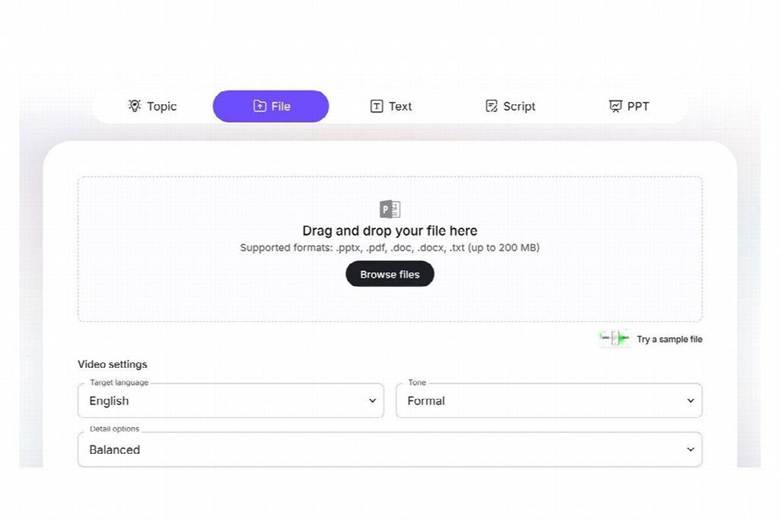
Inside the studio editor, inspect each generated scene card and apply the 40-word rule: keep each scene’s spoken narration between 35 and 45 words so the visual screen changes every fifteen seconds. Use an on-screen avatar presenter for the opening hook (“Here is why ninety percent of first-week expense reports get kicked back”) and the closing checklist, and let clean diagrams, document highlights, or step lists fill the screen during the middle procedural scenes.
Step 3: Add accessible captions and localize for multi-region cohorts
Career training programs increasingly serve learners who speak English as a second language or study on mobile devices during their commute. Following the W3C WAI guidelines for synchronized captions, enable clear on-screen subtitles and set pronunciation rules for industry acronyms (GAAP, HIPAA, SQL, CRM) so every technical term is spoken and spelled consistently. If your organization runs fellowship cohorts across multiple countries, you can translate the approved lesson script and on-screen text across 88 supported languages while keeping the exact same visual structure.

Step 4: Pair every three-minute clip with an immediate ten-minute drill
A microlearning video should never end with “Thanks for watching, click next video.” Binge-watching five short training videos in a row creates the illusion of competence without building actual muscle memory.
End the final scene of every clip with a single ten-minute practice prompt using real sample data: “Pause here, open the sample vendor invoice in Folder 02, find the two billing discrepancies we just covered, and paste your corrected line items into the cohort channel.” When trainees apply the rule within sixty seconds of watching the video, live mentor sessions stop feeling like remedial lectures and start functioning like real career coaching.